You can give your Instagram bio a bold, cursive or gothic look without installing a single app. Fancy fonts are special Unicode characters, so you copy them from a generator and paste them in. This guide shows how copy and paste fonts work, where they break, and how to avoid the empty boxes that sometimes appear. Want to skip ahead? Open the fancy text generator and come back if something looks off.
What Are Fancy Fonts, Really?
They aren’t fonts at all. Fancy fonts are different letters that happen to look like another style.
How Unicode Makes Fancy Fonts Possible
Unicode is the system that lets your phone show letters from every language. It also includes alternate alphabets: bold, script, circled and more. When you turn “Hello” into 𝓗𝓮𝓵𝓵𝓸, each letter is swapped for a different character that looks like cursive. Because the result is plain text, it travels with copy and paste.
Fancy Fonts vs. Real Fonts
A real font is a file that changes how normal letters are drawn. You can’t change Instagram’s font that way. What you can do is paste in letters that already look different. That’s why these copy and paste fonts work in places where you can’t pick a font.
How to Copy and Paste Fonts Into Your Instagram Bio
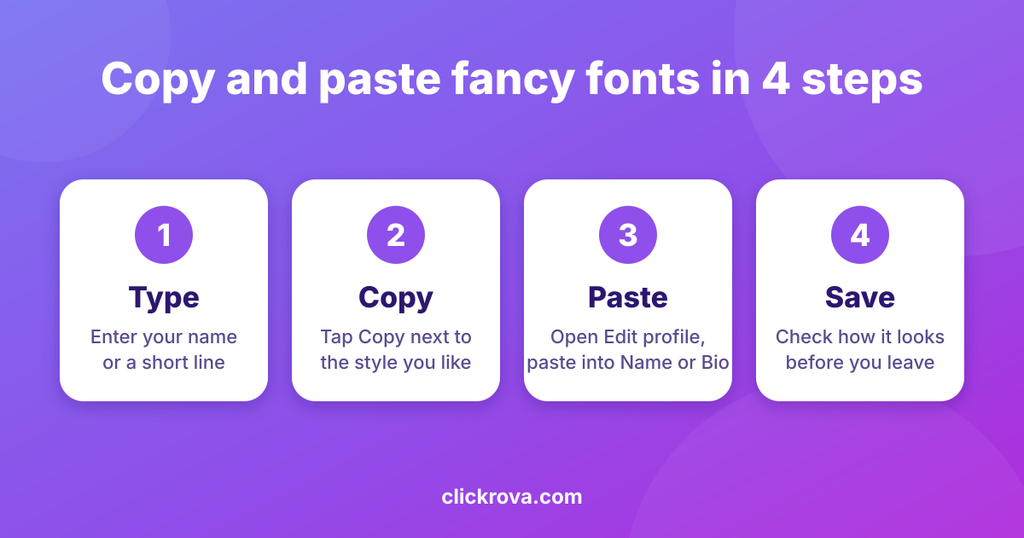
on your phone
- Open the generator and type your name or a short line.
- Tap Copy next to the style you like.
- Open Instagram, go to your profile, and tap Edit profile.
- Tap the Name or Bio field, paste, and save.
On a Computer
The steps are the same. Use Ctrl+V on Windows or Cmd+V on Mac to paste, then save your profile.
Popular Instagram Bio Fonts to Try
Here are the Instagram bio fonts people use most.
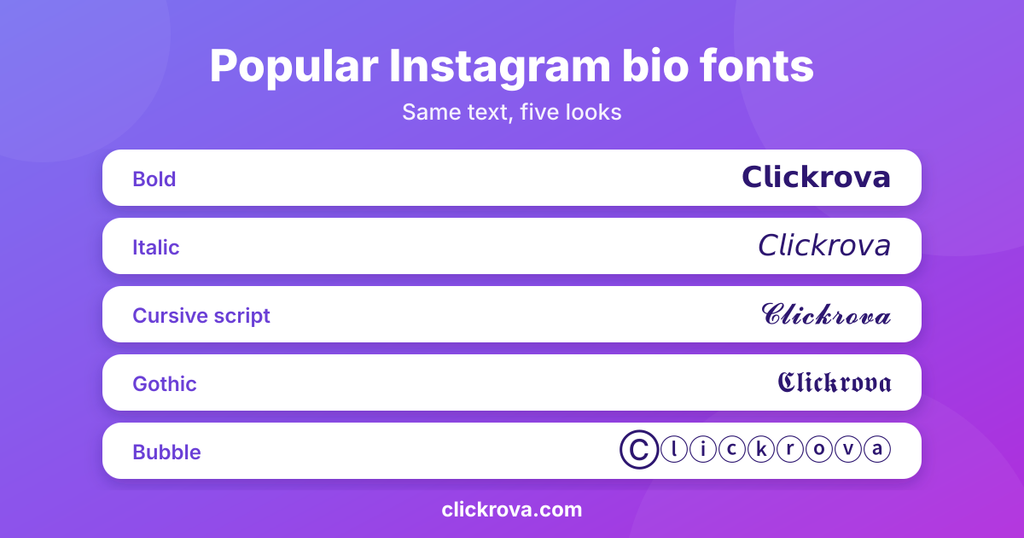
Bold and Italic
𝗛𝗲𝗹𝗹𝗼 and 𝘏𝘦𝘭𝘭𝘰 are the safest picks, because most devices can display them. If you only try one of the fancy fonts, start here.
Cursive Script
𝓗𝓮𝓵𝓵𝓸 looks elegant and works well for a name or a short headline. It gets harder to read in long sentences.
Gothic
𝕳𝖊𝖑𝖑𝖔 has a bold, old-English look. It suits gaming or music profiles, but a few phones may show boxes.
Bubble and Circled
Ⓗⓔⓛⓛⓞ is playful and easy to spot. It’s good for one word, not a full bio.
Where Fancy Fonts Work (and Where They Don’t)
Apps change their rules, so paste first, save, and check how it looks before you leave the screen.
Name and Bio
Usually works. Paste it, save it, and look at the result.
Username
Doesn’t work. Instagram usernames only allow letters, numbers, periods and underscores.
TikTok
The display name and bio usually accept the same fonts. The @username has stricter rules.
Discord
Display names and nicknames usually accept fancy fonts. Usernames follow stricter rules, so stick to plain letters there.
The About text and messages usually work. Older phones may show boxes.
Why Do I See Empty Boxes?
What Causes the Boxes
Every device has fonts built in, and each font only covers certain characters. If your font doesn’t include one, it draws a small box instead. Bold and italic are covered almost everywhere. Decorated styles are more likely to break on someone else’s phone.
How to Fix Them
Try a more common style. If other people will see your profile, check it on a second device. Stick with fancy fonts you’ve seen display correctly.
When You Shouldn’t Use Fancy Fonts
Accessibility
Screen readers can handle these characters badly, reading them one by one or announcing odd names. Keep a whole bio out of fancy fonts.
Search
If people type your name in normal letters, a styled version in the Name field might not match it.
Character Limits
Some platforms may count special characters differently, so your bio can fill up faster than you expect.
Important Details
Keep your email, location and booking link in plain text.
Tips for Better Looking Instagram Bio Fonts
- Pick one style and stick with it. Mixing three looks messy.
- Use it for a short line, like your name or a one-line headline.
- Keep key words in normal letters so people can still find you.
- Preview it on your phone, not just on a computer screen.
- Want a clean, spaced-out look? Read our blank name guide.
Fancy Fonts FAQ
Are fancy fonts real fonts?
No. They’re Unicode characters that look like a different font. Because they’re plain text, you can paste them into most apps, but you can’t change a font file this way. That’s why they work in places where you can’t pick a font at all.
Will fancy fonts work in my Instagram bio?
Usually, yes. Paste them into the Name or Bio field and save. Then check how it looks, since a few styles can show up as boxes on some devices. Bold and italic are the safest choices if you want something that works for most people.
Why do some letters show up as empty boxes?
The device doesn’t have a font that includes that character, so it draws a box instead. Try a more common style like bold or italic, or check the text on another phone to see if the problem is on your end or theirs.
Can I use fancy fonts in my username?
Usually not. Instagram, TikTok and Discord usernames only allow a limited set of characters, so fancy fonts get rejected there. Use them in your display name or bio instead, and keep the username in plain letters. That also keeps people able to find you.
Do fancy fonts hurt accessibility?
They can. Screen readers may read these characters one at a time or announce odd names for them. Use fancy fonts for a short name or headline, and keep important details like links and contact info in plain text. That way everyone can read them.
Is it free to copy and paste fonts on a phone?
Yes. You open the page in your browser, type your text, copy the style you like and paste it. There’s nothing to install and you don’t need an account. Everything runs in your browser.
Ready to try it? Open the fancy text generator, pick a style, and test it in your bio.
Pingback: Arabic Stylish Name: Copy & Paste Arabic Names (2026)